SpringMVC简介
- SpringMVC中重要组件:
DispatcherServlet:前端控制器,接收所有请求(如果配置/则不包含jsp)HandlerMapping:解析请求格式,判断希望要执行哪个具体的方法。HandlerAdapter:负责调用具体的方法。ViewResolver:视图解析器。解析结果,准备跳转到具体的物理视图。
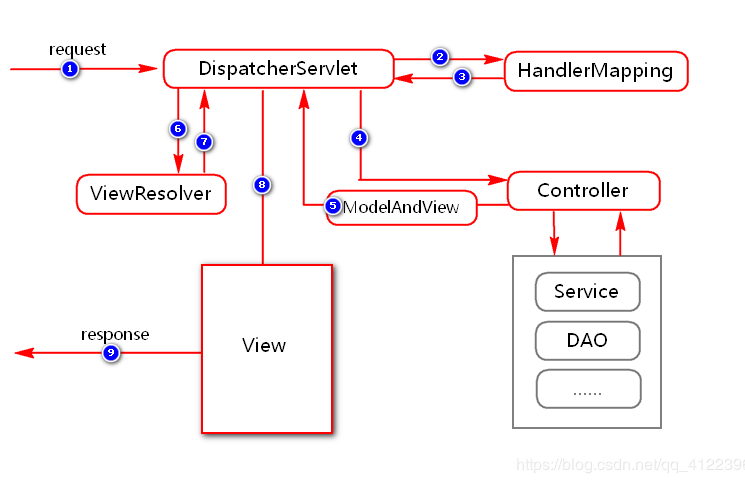
- SpringMVC运行原理图。
- Spring容器和Springmvc容器的关系
- 代码
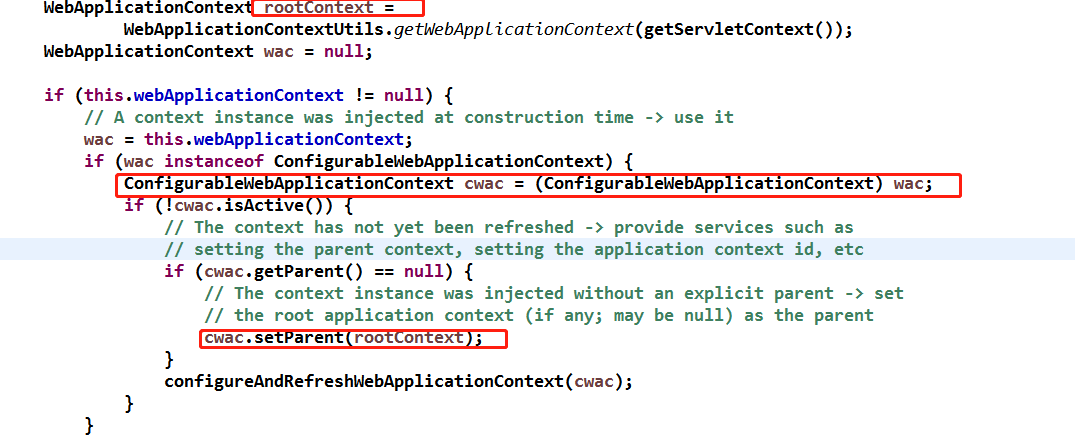
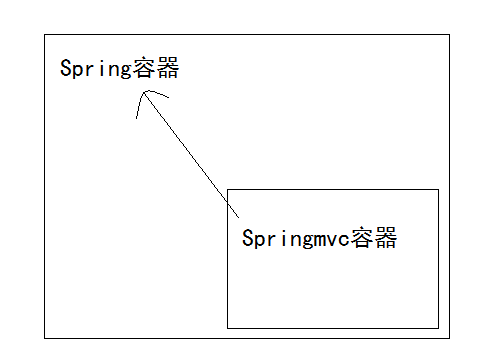
- Spring容器和Springmvc容器的关系是父子容器
- Springmvc容器中能够调用Spring容器的所有内容
- 图示
SpringMVC环境搭建
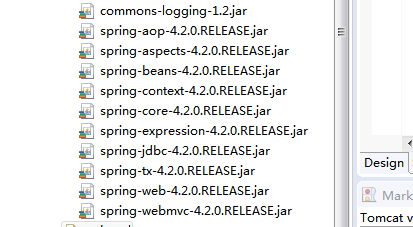
- 导入jar包
在web.xml中配置前端控制器:DispatcherServlet
- 如果不配置
<init-param>,则会在/WEB-INF/找配置文件
1
2
3
4
5
6
7
8
9
10
11
12
13
14
15
16
17
18
<web-app xmlns:xsi="http://www.w3.org/2001/XMLSchema-instance" xmlns="http://java.sun.com/xml/ns/javaee" xsi:schemaLocation="http://java.sun.com/xml/ns/javaee http://java.sun.com/xml/ns/javaee/web-app_3_0.xsd" version="3.0">
<servlet>
<servlet-name>springmvc</servlet-name>
<servlet-class>org.springframework.web.servlet.DispatcherServlet</servlet-class>
<!-- 修改配置文件路径和名称 -->
<init-param>
<param-name>contextConfigLocation</param-name>
<param-value>classpath:springmvc.xml</param-value>
</init-param>
<!-- 自启动 -->
<load-on-startup>1</load-on-startup>
</servlet>
<servlet-mapping>
<servlet-name>springmvc</servlet-name>
<url-pattern>/</url-pattern>
</servlet-mapping>
</web-app>- 如果不配置
新建Springmvc.xml配置文件,引入
xmlns:mvc属性命名空间。1
2
3
4
5
6
7
8
9
10
11
12
13
14
15
16
17
18
19
20
21
<beans xmlns="http://www.springframework.org/schema/beans"
xmlns:xsi="http://www.w3.org/2001/XMLSchema-instance"
xmlns:context="http://www.springframework.org/schema/context"
xmlns:mvc="http://www.springframework.org/schema/mvc"
xsi:schemaLocation="http://www.springframework.org/schema/beans
http://www.springframework.org/schema/beans/spring-beans.xsd
http://www.springframework.org/schema/context
http://www.springframework.org/schema/context/spring-context.xsd
http://www.springframework.org/schema/mvc
http://www.springframework.org/schema/mvc/spring-mvc.xsd">
<!-- 注解扫描器 -->
<context:component-scan base-package="com.gdaib.controller"></context:component-scan>
<!-- 配置注解驱动 --><!-- 相当于配置如下两个属性 -->
<!-- org.springframework.web.servlet.mvc.annotation.DefaultAnnotationHandlerMapping -->
<!-- org.springframework.web.servlet.mvc.annotation.AnnotationMethodHandlerAdapter -->
<mvc:annotation-driven></mvc:annotation-driven>
<!-- 静态资源 -->
<!-- 第一个参数:不拦截某个目录,第二个参数访问的路径,**代表该目录下的所有文件 -->
<mvc:resources location="/js/" mapping="/js/**"></mvc:resources>
</beans>编写控制器类
1
2
3
4
5
6
7
8
9
10
11
12
13
14
15
16
17
18
package com.gdaib.controller;
import org.springframework.stereotype.Controller;
import org.springframework.web.bind.annotation.RequestMapping;
public class DemoController {
("demo")
public String demo() {
System.out.println("执行demo");
return "main.jsp";
}
("demo2")
public String demo2() {
System.out.println("指定demo2");
return "main.jsp";
}
}
字符编码过滤器
- 在
web.xml中配置Filter1
2
3
4
5
6
7
8
9
10
11
12
13<!-- 解决中文乱码 -->
<filter>
<filter-name>encoding</filter-name>
<filter-class>org.springframework.web.filter.CharacterEncodingFilter</filter-class>
<init-param>
<param-name>encoding</param-name>
<param-value>utf-8</param-value>
</init-param>
</filter>
<filter-mapping>
<filter-name>encoding</filter-name>
<url-pattern>/*</url-pattern>
</filter-mapping>
传参
把内容写到方法(HandlerMethod)参数中, SpringMVC中只要有这个内容,注入内容
基本数据类型参数,默认保证参数名称和参数名称一样
1
2
3
4
5
6("demo")
public String demo(String name,int age) {
System.out.println("执行demo");
System.out.println(name + "|" + age);
return "main.jsp";
}如果请求名和参数名不对应应使用
@RequestParam()赋值1
2
3
4
5
6("demo")
public String demo(@RequestParam(value="name")String name,@RequestParam(value="age")int age) {
System.out.println("执行demo");
System.out.println(name + "|" + age);
return "main.jsp";
}如果方法参数是基本数据类型(不是封装类),可以为其设置默认值
1
2
3
4
5
6//如果参数为空时,为他们设置默认值
("page")
public String page(@RequestParam(defaultValue = "2")int pageSize,@RequestParam(defaultValue = "1")int pageNumber) {
System.out.println(pageSize+" "+pageNumber);
return "main.jsp";
}如果强制要求必须有某个参数
1
2
3
4
5("demo2")
public String demo2(@RequestParam(required = true)String name) {
System.out.println("必须传递name参数:"+name);
return "main.js";
}HandlerMethod中参数是对象类型,请求参数名和对象中属性一致(get/set)
1
2
3
4("demo4")
public String demo4(People peo) {
return "main.js";
}请求参数中包含多个同名参数的获取方法
- 复选框传递的参数就是多个同名参数
1
2
3
4
5("demo5")
public String demo5(String name,int age,@RequestParam("hover")List<String> hover) {
System.out.println(name + " "+age+" "+hover);
return "main.jsp";
}请求参数中对象.属性格式
- JSP代码
1
2
<input type="text" name="peo.name"/>
<input type="text" name="peo.age"/>
- 新建一个类
1 | public class Demo { |
- 控制器
1 | ("demo06") |
- 在请求参数中传递集合对象类型对象
- JSP页面
1
2
3
4<input type="text" name="peo[0].name"/>
<input type="text" name="peo[0].age"/>
<input type="text" name="peo[1].name"/>
<input type="text" name="peo[1].age"/>
- 新建一个类
1 | public class Demo { |
- 控制器类
1 | ("demo06") |
- restful风格
- 简化jsp中参数编写格式
- 在JSP中设定特定的格式
1
<a href="demo08/1232/abcd">跳转</a>
- 在控制器中
- 在
@RequestMapping中一定要和请求格式对应- {名称}中名称自定义
@PathVariable获取@RequestMapping中内容,默认按照方法参数名称去寻找。
1 | //restful |
跳转方式
默认的跳转方式:请求转发。
设置返回字符串的内容
- 添加 redirect:资源路径 ————> 重定向
- 添加 forward:资源路径/省略 ————> 转发
视图解析器
Springmvc会提供默认解析器
程序员自定义解析器
1
2
3
4
5<!-- 配置视图解析器 -->
<bean id="" class="org.springframework.web.servlet.view.InternalResourceViewResolver">
<property name="prefix" value="/"></property>
<property name="suffix" value=".jsp"></property>
</bean>如果希望不执行自定义解析器,在方法返回值前面添加
forward或者redirect1
2
3
4
5("demo07")
public String demo7(int id,String name) {
System.out.println(id+" "+name);
return "forward:main.jsp";
}