第一讲 Hibernate简介
Hibernate是一个轻量级、ORM的框架。完成数据的持久化。是对jdbc的封装,简化jdbc操作。使用Hibernate后,不需要编写Sql语句,是一个全自动的持久化框架。使用Hibernate后,可以跨数据库平台。提高开发效率。- 持久化:就是数据从瞬时状态变为持久状态的过程。
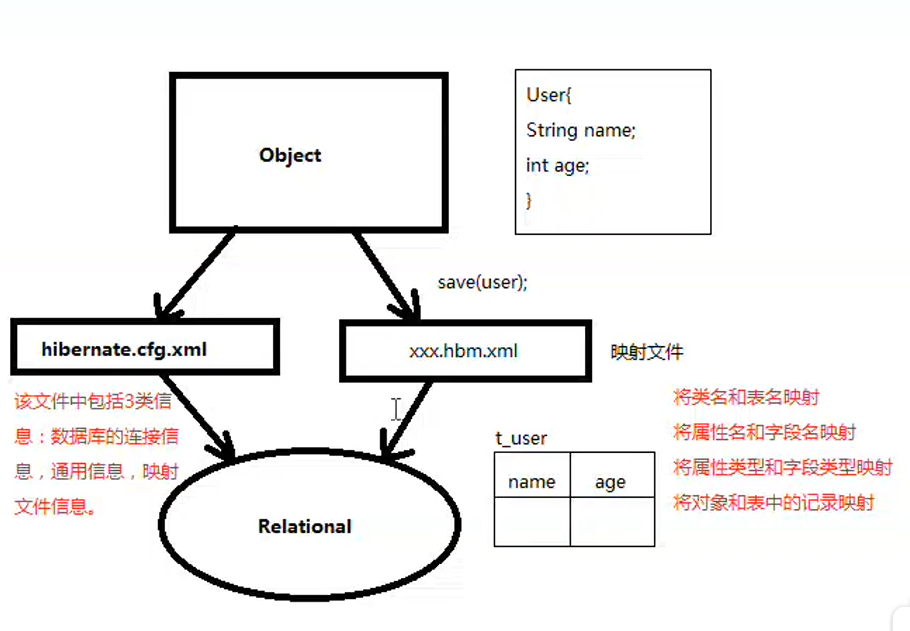
ORM:Object Relational Mapping,对象关系映射.使得操作关系可以像操作对象一样方便。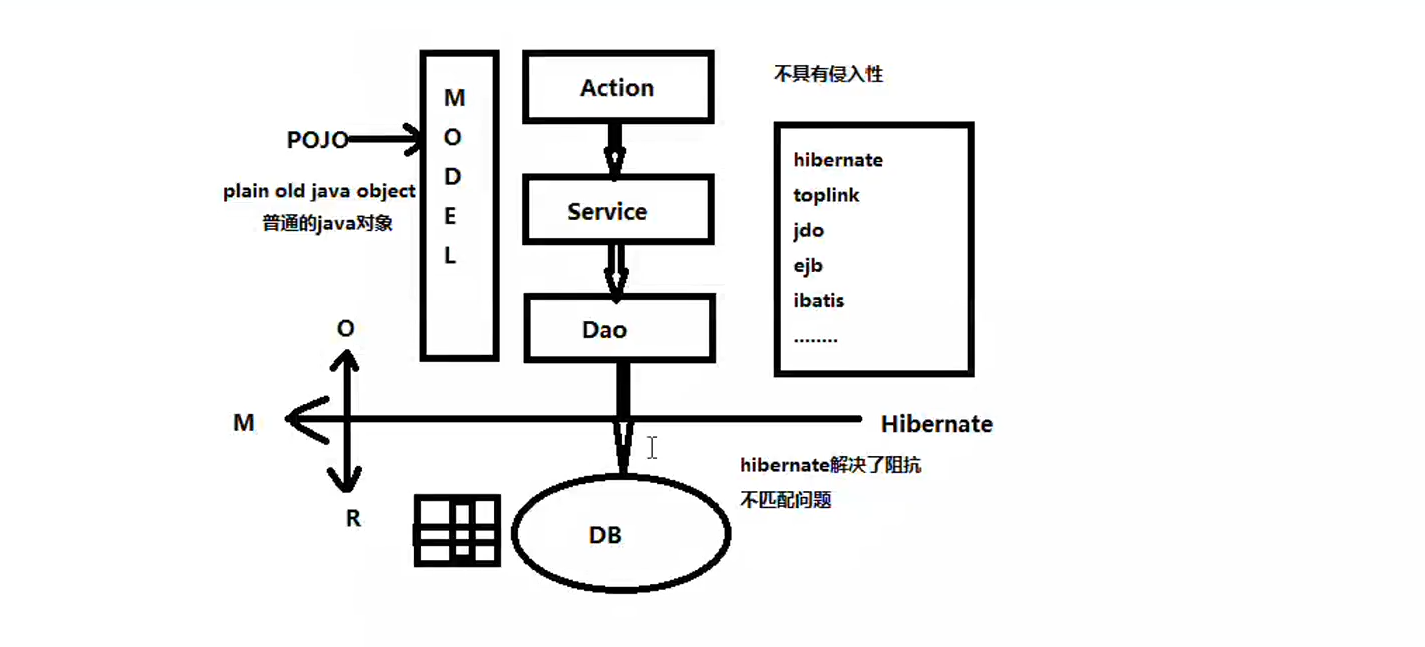
- 结构体系
第二讲 helloworld
- 使用
hibernate进行helloworld程序开发,步骤:
新建
Java项目导入
hibernatejar包新建数据库表
新建
pojo对象编写
User.hbm.xml1
2
3
4
5
6
7
8
9
10
11
12
13
14
15
16
<hibernate-mapping>
<class name="com.zhuchuli.vo.User" table="t_user">
<!-- 主键映射 -->
<id name="id" column="id" type="int">
<!-- 主键生成策略 -->
<generator class="native"/>
</id>
<property name="name" column="name" type="java.lang.String"></property>
<property name="age" column="age" type="int"></property>
</class>
</hibernate-mapping>在
src包下新建hibernate.cfg.xml1
2
3
4
5
6
7
8
9
10
11
12
13
14
15
<hibernate-configuration>
<session-factory>
<property name="connection.driver_class">com.mysql.cj.jdbc.Driver</property>
<property name="connection.url">jdbc:mysql://localhost:3306/hibernate4?serverTimezone=UTC</property>
<property name="connection.username">root</property>
<property name="connection.password">123456</property>
<!-- 指定数据库的方言 -->
<property name="dialect">org.hibernate.dialect.MySQLDialect</property>
<mapping resource="com/zhuchuli/vo/User.hbm.xml"/>
</session-factory>
</hibernate-configuration>测试
1
2
3
4
5
6
7
8
9
10
11
12
13
14
15
16
17
18
19
20
21
22
23
24
25
26
27
28
29
30
31package com.zhuchuli.test;
import org.hibernate.Session;
import org.hibernate.SessionFactory;
import org.hibernate.boot.registry.StandardServiceRegistryBuilder;
import org.hibernate.cfg.Configuration;
import org.hibernate.service.ServiceRegistry;
import com.zhuchuli.vo.User;
public class HiberatorTest {
public static void main(String[] args) {
//1.读取hibrator.cfg.xml配置文件
Configuration cfg=new Configuration().configure();
//2.创建服务注册
ServiceRegistry registery=new StandardServiceRegistryBuilder()
.applySettings(cfg.getProperties())
.build();
//3.新建sessionFactory对象
SessionFactory factory=cfg.buildSessionFactory(registery);
//4.创建session对象
Session session=factory.openSession();
//5.获取数据
User user=(User) session.get(User.class,1);
System.out.println(user);
//6.释放资源
session.close();
factory.close();
}
}
第三讲 配置文件讲解
hibernate.cfg.xml是hibernate的主配置文件,Configuration读取的也是该对象。1
2
3
4
5
6
7
8
9
10
11
12
13
14
15
16
17
18
19
20
21
22
23
24
25
26
<hibernate-configuration>
<session-factory>
<!--
数据库连接信息
根据不同的数据库,要配置不同参数信息。
-->
<property name="connection.driver_class">com.mysql.cj.jdbc.Driver</property>
<property name="connection.url">jdbc:mysql://localhost:3306/hibernate4?serverTimezone=UTC</property>
<property name="connection.username">root</property>
<property name="connection.password">123456</property>
<!-- 通用配置 -->
<!-- 指定数据库的方言 -->
<property name="dialect">org.hibernate.dialect.MySQLDialect</property>
<!-- 打印sql语句 -->
<property name="show_sql">true</property>
<!-- 格式化sql语句 -->
<property name="format_sql">true</property>
<!-- 映射文件信息 -->
<mapping resource="com/zhuchuli/vo/User.hbm.xml"/>
</session-factory>
</hibernate-configuration>映射文件:
Xxx-hbm.xml- 非关系型数据库:
MongoDB、HBase、redis - 《组成原理》《编译原理》
1
2
3
4
5
6
7
8
9
10
11
12
13
14
15
16
17
18
19
20
21
22
23
24
25
26
27
28
29
30
31
32
33
34
35
36
37
38
39
40
41
42
43
<!-- package用于指定类所在的包,如果不指定,那么在指定class的name时,需要指定完全限定名 -->
<hibernate-mapping package="com.zhuchuli.vo">
<!--
class指定类的映射信息
name指定类,如果没有指定package时需要使用完全限定名
table指定类对应的数据库的数据表名,如果不指定,默认和类型相同。
schema:指定模式
-->
<class name="User" table="t_user" schema="">
<!--
主键映射
在hibernate中,类所对应的表必须要有主键
name:为类所的属性名
column:是属性名所对应的表的字段名称,类型是属性的类型
column默认很属性名一致,类型默认和属性的类型一致。
length 指定长度
-->
<id name="id" column="id" type="int">
<!--
主键生成策略
Oracle数据库 自增生成策略
<generator class="sequence">
<param name="sequence">user_seq</param>
</generator>
UUID:生成的字符串唯一
hilo:使用一个高/低位算法高效生成long,short或int类型的标识符
assign:自己输入主键
forign:
-->
<generator class="native"/>
</id>
<!-- property 指定属性的映射 -->
<property name="name" column="name" type="java.lang.String"></property>
<property name="age" column="age" type="int"></property>
</class>
</hibernate-mapping>- 非关系型数据库:
第四讲 工具类及hibernate crud操作
工具类Util
1
2
3
4
5
6
7
8
9
10
11
12
13
14
15
16
17
18
19
20
21
22
23
24
25
26
27
28
29
30
31
32
33
34
35
36
37
38
39
40
41
42
43
44package com.zhuchuli.util;
import org.hibernate.Session;
import org.hibernate.SessionFactory;
import org.hibernate.boot.registry.StandardServiceRegistryBuilder;
import org.hibernate.cfg.Configuration;
import org.hibernate.service.ServiceRegistry;
public class HibernateUtil {
private static Configuration cfg=null;
private static ServiceRegistry registery=null;
private static SessionFactory factory=null;
private static ThreadLocal<Session> sessionLocal=null;
static {
cfg=new Configuration().configure();
registery=new StandardServiceRegistryBuilder()
.applySettings(cfg.getProperties())
.build();
/***
* sessionFactory是一个重量级对象,在一个应用中只需一个即可。是一个
* 进程级别对象,可以在集群中使用。
* 操作完后一般不会释放资源。
*/
factory=cfg.buildSessionFactory(registery);
sessionLocal=new ThreadLocal<Session>();
}
public static Session getSession() {
if( sessionLocal.get()!=null && !sessionLocal.get().isOpen()) {
sessionLocal.set(null);
}
if(sessionLocal.get() == null) {
sessionLocal.set(factory.openSession());
}
return sessionLocal.get();
}
//释放资源
public static void close() {
if(sessionLocal.get()!=null) {
sessionLocal.get().close();
sessionLocal.set(null);
}
}
}crud操作
1
2
3
4
5
6
7
8
9
10
11
12
13
14
15
16
17
18
19
20
21
22
23
24
25
26
27
28
29
30
31
32
33
34
35
36
37
38
39
40
41
42
43
44
45
46
47
48
49
50
51
52
53
54
55
56
57
58
59
60
61
62
63
64
65
66
67
68
69
70
71
72
73
74
75
76
77
78
79
80
81
82
83
84
85
86
87
88
89
90
91package com.zhuchuli.hibernate.test;
import org.hibernate.Session;
import org.hibernate.Transaction;
import com.zhuchuli.util.HibernateUtil;
import com.zhuchuli.vo.User;
public class HibernateTest {
public static void main(String[] args) {
}
//删除 先查后删除。
private static void delete() {
Session session=null;
Transaction tx=null;
try {
//获取Session对象
session= HibernateUtil.getSession();
//获取事务并且开启事务
tx= session.beginTransaction();
User user=(User) session.get(User.class, 4);
//删除
session.delete(user);
//提交事务
tx.commit();
} catch (Exception e) {
e.printStackTrace();
if(tx!=null) {
tx.rollback();
}
}finally {
HibernateUtil.close();
}
}
//修改数据 先查在修改最后再删除
private static void update() {
Session session=null;
Transaction tx=null;
try {
//获取Session对象
session= HibernateUtil.getSession();
//获取事务并且开启事务
tx= session.beginTransaction();
User user=(User) session.get(User.class, 4);
System.out.println(user);
user.setName("小六六");
//修改
session.save(user);
//提交事务
tx.commit();
} catch (Exception e) {
e.printStackTrace();
if(tx!=null) {
tx.rollback();
}
}finally {
HibernateUtil.close();
}
}
//
//增加数据
private static void save() {
Session session=null;
Transaction tx=null;
try {
//获取Session对象
session= HibernateUtil.getSession();
//获取事务并且开启事务
tx= session.beginTransaction();
/* 下面两句话等同上面一句话
Transaction tx=session.getTransaction();
tx.begin();
*/
User user = new User();
user.setName("刘德华");
user.setAge(53);
//保存数据
session.save(user);
//提交事务
tx.commit();
} catch (Exception e) {
e.printStackTrace();
if(tx!=null) {
tx.rollback();
}
}finally {
HibernateUtil.close();
}
}
}
第五讲
- 软件工程步骤:
- 需要分析、概要分析、详细分析、编程、测试、发布
- 测试:
- 黑盒测试:工人测试。
- 白盒测试:Junit,需要编码实现
1
2
3
4
5
6
7
8
9
10
11
12
13
14
15
16
17
18
19
20
21
22
23
24
25
26
27
28
29
30
31
32
33
34
35
36
37
38
39
40
41
42
43
44
45
46
47package com.zhuchuli.test;
import org.hibernate.Session;
import org.hibernate.Transaction;
import org.junit.After;
import org.junit.Before;
import org.junit.Test;
import com.zhuchuli.util.HibernateUtil;
import com.zhuchuli.vo.User;
public class HibernateTest {
private Session session=null;
private Transaction tx=null;
public void setUp() {
try {
//获取Session对象
session = HibernateUtil.getSession();
//获取事务并且开启事务
tx = session.beginTransaction();
} catch (Exception e) {
e.printStackTrace();
}
}
public void tear() {
HibernateUtil.close();
}
public void testSave() {
try {
User user = new User();
user.setName("张学友");
user.setAge(53);
//保存数据
session.save(user);
//提交事务
tx.commit();
} catch (Exception e) {
e.printStackTrace();
if(tx!=null) {
tx.rollback();
}
}
}
}
第六讲 对象生命周期
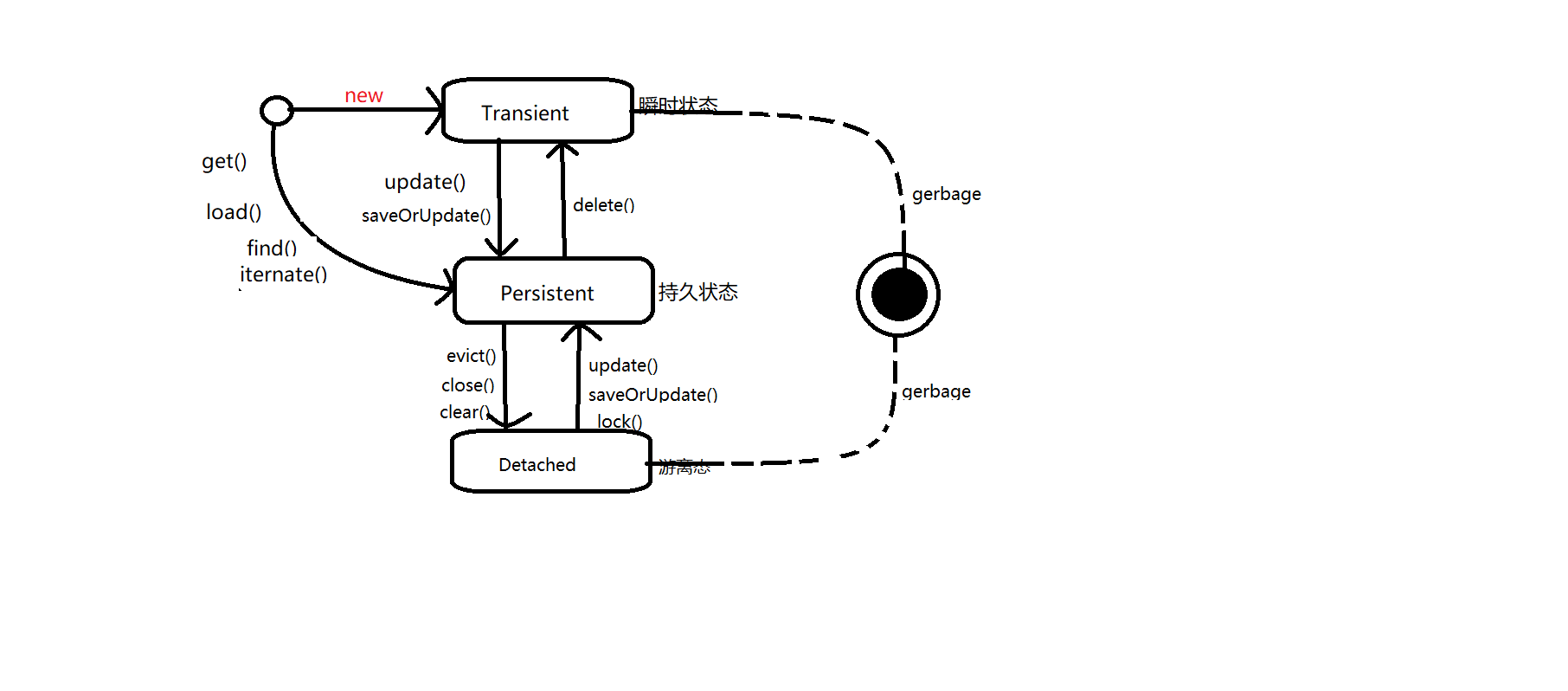
- 对象生命周期图
- 两种路线
new—> 瞬时状态 —> save() —> 持久状态 —> close() —> 游离状态。
1
2
3
4
5
6
7
8
9
10
11
12
13
14
15
16
17
18
19
20
21
22
23
24
25
26
27
28
29//测试对象生命周期:第一条线路
public void testSession1() {
User user=null;
try {
//user处于瞬时状态
user = new User();
user.setName("kkk");
user.setAge(40);
//user处于持久状态
//对象处于持久状态时被session管理
session.save(user);
//对象处于持久状态时,提交事务前会将session中对象与数据库中的记录进行脏数据检查,如果不一致则进行数据同步。
//user.setAge(23);//此时会自动调用update()
//提交事务
tx.commit();
} catch (Exception e) {
e.printStackTrace();
if(tx!=null) {
tx.rollback();
}
}
//请除指定对象 ----> session不再管理user
//user此时处于游离状态,可能会把垃圾回收站回收。
session.evict(user);
//close关闭session
session.close();
//clear清楚session所有对象
}
- Get —> 持久状态 —> clear —> 游离状态 —> update() —> 持久状态 –> delete() —> 瞬时状态
1 | //测试对象生命周期:第二条线路 |
总结
- 瞬时状态 session没有,数据库没有
- 持久状态 session有,数据库有,在该状态下会进行脏数据的读取
- 游离状态 session没有,数据库有
第七讲 hibernate与struts2框架的整合
第八讲 关联映射之单向多对一
SchemaExport工具类1
2
3
4
5
6
7
8
9
10
11
12/***
* 将对象信息 转换为 关系信息
*/
public void testCreateDB() {
Configuration cfg=new Configuration().configure();
//使得hibernate映射信息转化为ddl(数据库定义语言)
SchemaExport se = new SchemaExport(cfg);
//第一参数:是否打印ddl语句
//第二个参数:是否将ddl到数据库执行
se.create(true, true);
}通用配置实现hbm to ddl
1
2
3
4
5
6
7<!--
hbm2ddl.auto:该属性用于配置 是否将映射信息转换为关系信息
create:每次执行都会删除表再创建表
update:先检查数据库中表是否存在,如果不存在则先创建表,通常使用update
create-drop:
-->
<property name="hbm2ddl.auto">create</property>类与类之间的关系
- 依赖 –> 关联 –> 组合 –> 聚合
学生和班级的信息是一个多对一的关系
- 表结构

- 类结构:
1
2
3
4
5
6
7
8
9
10
11
12
13
14
15
16
17
18
19
20
21
22
23
24
25
26
27
28
29
30
31
32
33
34
35
36
37
38
39
40
41
42
43
44
45
46
47
48package com.zhuchuli.vo;
import java.io.Serializable;
/***
* 学生类
* @author 朱楚利
*
*/
public class Student implements Serializable{
private int id;
private String name;
private int age;
private String sex;
//学生所对应的班级
private Cluss cluss;
public int getId() {
return id;
}
public void setId(int id) {
this.id = id;
}
public String getName() {
return name;
}
public void setName(String name) {
this.name = name;
}
public int getAge() {
return age;
}
public void setAge(int age) {
this.age = age;
}
public String getSex() {
return sex;
}
public void setSex(String sex) {
this.sex = sex;
}
public Cluss getCluss() {
return cluss;
}
public void setCluss(Cluss cluss) {
this.cluss = cluss;
}
}- 表结构
1 | package com.zhuchuli.vo; |
- 映射文件
- 班级映射文件:Cluss.hbm.xml
1
2
3
4
5
6
7
8
9<hibernate-mapping package="com.zhuchuli.vo">
<class name="Cluss" table="t_class">
<id name="id">
<generator class="native"></generator>
</id>
<property name="name"></property>
<property name="address"></property>
</class>
</hibernate-mapping>
- 学生映射文件:Student.hbm.xml
1 | <hibernate-mapping package="com.zhuchuli.vo"> |
- hibernate.cfg.xml
1 | <hibernate-configuration> |
- 测试
1 |
|
第九讲 关联映射之单向一对多关联
- 还是考虑学生和班级的关系。有的时候查询班级需要将班级对应的学生信息一起查询,这个时候使用一对多的关联比较方便。
- 表结构:与上面一样。
- 类结构:
- 班级类 Cluss.java
1
2
3
4
5
6
7
8
9
10
11
12
13
14
15
16
17
18
19
20
21
22
23
24
25
26
27
28
29
30
31public class Cluss implements Serializable{
private int id;
private String name;
private String address;
private Set<Student> students=new HashSet<Student>();
public Set<Student> getStudents() {
return students;
}
public void setStudents(Set<Student> students) {
this.students = students;
}
public int getId() {
return id;
}
public void setId(int id) {
this.id = id;
}
public String getName() {
return name;
}
public void setName(String name) {
this.name = name;
}
public String getAddress() {
return address;
}
public void setAddress(String address) {
this.address = address;
}
}
- 学生类 Student.java
1 | package com.zhuchuli.vo; |
- 映射文件
- Student.hbm.xml
1 | <hibernate-mapping package="com.zhuchuli.vo"> |
- Cluss.hbm.xml
1 | <hibernate-mapping package="com.zhuchuli.vo"> |
- 测试
1 | public class HibernateTest { |
关联映射之双向多对一
- 学生和班级的双向关联,表结构,与上面表结构一样
- 类结构
- Cluss.java
1
2
3
4
5
6
7
8
9
10
11
12
13
14
15
16
17
18
19
20
21
22
23
24
25
26
27
28
29
30
31public class Cluss implements Serializable{
private int id;
private String name;
private String address;
private Set<Student> students=new HashSet<Student>();
public Set<Student> getStudents() {
return students;
}
public void setStudents(Set<Student> students) {
this.students = students;
}
public int getId() {
return id;
}
public void setId(int id) {
this.id = id;
}
public String getName() {
return name;
}
public void setName(String name) {
this.name = name;
}
public String getAddress() {
return address;
}
public void setAddress(String address) {
this.address = address;
}
}
- Student.java
1 | public class Student implements Serializable{ |
- 映射文件
- Cluss.hbm.xml
1
2
3
4
5
6
7
8
9
10
11
12
13
14
15
16
17
18<!-- package用于指定类所在的包,如果不指定,那么在指定class的name时,需要指定完全限定名 -->
<hibernate-mapping package="com.zhuchuli.vo">
<class name="Cluss" table="t_class">
<id name="id">
<generator class="native"></generator>
</id>
<property name="name"></property>
<property name="address"></property>
<!-- 1对多的关联 name为属性名 -->
<set name="students" inverse="true">
<!-- column指定外键名 -->
<key column="cluss_id"></key>
<!-- 指定多的一端的类型 -->
<one-to-many class="Student"/>
</set>
</class>
</hibernate-mapping>
- Student.hbm.xml
1 |
|
- 测试
1
2
3
4
5
6
7
8
9
10
11
12
13
14
15
16
17
18
19
20
21
22
23
24
25
26
27
28
29
30
31
32
33
34
35
36
37
38
39
40
41
42
43
44
45
46
47
48
49
50
51
52
53
54
55
56
57
58
59
60
61
62
63
64
65
66
67
68
69
70
71
72
73
74
75
76
77
78
79
80
81
82
83
84
85
86
87
88
89
90
91
92
93
94
95
96
97
98
99
100
101
102
103
104
105
106
107
108package com.zhuchuli.test;
import org.hibernate.Session;
import org.hibernate.Transaction;
import org.hibernate.cfg.Configuration;
import org.hibernate.tool.hbm2ddl.SchemaExport;
import org.junit.After;
import org.junit.Before;
import org.junit.Test;
import com.zhuchuli.util.HibernateUtil;
import com.zhuchuli.vo.Cluss;
import com.zhuchuli.vo.Student;
public class HibernateTest {
private Session session=null;
private Transaction tx=null;
public void setUp() {
try {
//获取Session对象
session = HibernateUtil.getSession();
//获取事务并且开启事务
tx = session.beginTransaction();
} catch (Exception e) {
e.printStackTrace();
}
}
public void tear() {
HibernateUtil.close();
}
/***
* 将对象信息 转换为 关系信息
*/
public void testCreateDB() {
Configuration cfg=new Configuration().configure();
//使得hibernate映射信息转化为ddl(数据库定义语言)
SchemaExport se = new SchemaExport(cfg);
//第一参数:是否打印ddl语句
//第二个参数:是否将ddl到数据库执行
se.create(true, true);
}
/***
* 一对多关联时保存数据会多出n挑更新语句,降低效率
* 一般不会使用一对多来关联映射
*/
public void testInit() {
try {
Cluss c1=new Cluss();
c1.setName("208");
c1.setAddress("B-2");
Cluss c2=new Cluss();
c2.setName("301");
c2.setAddress("B-3");
session.save(c1);
session.save(c2);
Student s1=new Student();
s1.setName("张三");
s1.setAge(23);
s1.setSex("男");
//设置学生的外键,如果不设置,保存的学生将没有外键值
s1.setCluss(c1);
Student s2=new Student();
s2.setName("李四");
s2.setAge(22);
s2.setSex("男");
//设置学生的外键,不高不设置,保存的学生将没有外键值
s2.setCluss(c2);
Student s3=new Student();
s3.setName("王小蒙");
s3.setAge(20);
s3.setSex("女");
//设置学生的外键,不高不设置,保存的学生将没有外键值
s3.setCluss(c1);
session.save(s1);
session.save(s2);
session.save(s3);
c1.getStudents().add(s1);
c1.getStudents().add(s3);
c2.getStudents().add(s2);
tx.commit(); //提交5个事务,保存数据
} catch (Exception e) {
e.printStackTrace();
if(tx!=null)tx.rollback();
}
}
//关联映射主要为查询服务 当具有多对一关系时,在获取多的一段的信息时可以直接获取一的一端的信息
public void testGet() {
Student s1=(Student) session.get(Student.class, 1);
System.out.println(s1.getName()+"-->"+s1.getCluss().getName());
//获取班级信息
System.out.println("================");
Cluss c1=(Cluss) session.get(Cluss.class, 1);
System.out.println(c1.getName()+"--->" +c1.getAddress());
System.out.println("--------------");
for (Student s : c1.getStudents()) {
System.out.println(s.getName() + "--->" + s.getAge());
}
}
}
关联映射之基于外键的单向一对一
- 身份证和人是一对一关系:
- 表结构

- 类结构
- Person.java
1
2
3
4
5
6
7
8
9
10
11
12
13
14
15
16
17
18
19
20
21
22
23
24
25
26
27
28
29
30
31
32
33package com.zhuchuli.vo;
public class Person {
private int id;
private String name;
private String sex;
private Card card;
public int getId() {
return id;
}
public void setId(int id) {
this.id = id;
}
public String getName() {
return name;
}
public void setName(String name) {
this.name = name;
}
public String getSex() {
return sex;
}
public void setSex(String sex) {
this.sex = sex;
}
public Card getCard() {
return card;
}
public void setCard(Card card) {
this.card = card;
}
}
- Card.java
1 | package com.zhuchuli.vo; |
- 映射文件
- Card.hbm.xml
1
2
3
4
5
6
7
8
9
10
11
12<hibernate-mapping package="com.zhuchuli.vo">
<class name="Card" table="t_card">
<id name="id" column="id">
<generator class="native"/>
</id>
<!-- property 指定属性的映射 -->
<property name="address"></property>
</class>
</hibernate-mapping>
- Person.hbm.xml
1 | <hibernate-mapping package="com.zhuchuli.vo"> |
- 测试
1
2
3
4
5
6
7
8
9
10
11
12
13
14
15
16
17
18
19
20
21
22
23
24
25
26
27
28
29
30
31
32
33
34
35
36
37
38
39
40
41
42
43
44
45
46
47
48
49
50
51
52
53
54
55
56
57
58
59
60
61
62
63
64
65
66
67
68
69
70
71
72
73
74
75
76
77
78
79
80
81
82
83
84
85
86package com.zhuchuli.test;
import org.hibernate.Session;
import org.hibernate.Transaction;
import org.hibernate.cfg.Configuration;
import org.hibernate.tool.hbm2ddl.SchemaExport;
import org.junit.After;
import org.junit.Before;
import org.junit.Test;
import com.zhuchuli.util.HibernateUtil;
import com.zhuchuli.vo.Card;
import com.zhuchuli.vo.Person;
public class HibernateTest {
private Session session=null;
private Transaction tx=null;
public void setUp() {
try {
//获取Session对象
session = HibernateUtil.getSession();
//获取事务并且开启事务
tx = session.beginTransaction();
} catch (Exception e) {
e.printStackTrace();
}
}
public void tear() {
HibernateUtil.close();
}
/***
* 将对象信息 转换为 关系信息
*/
public void testCreateDB() {
Configuration cfg=new Configuration().configure();
//使得hibernate映射信息转化为ddl(数据库定义语言)
SchemaExport se = new SchemaExport(cfg);
//第一参数:是否打印ddl语句
//第二个参数:是否将ddl到数据库执行
se.create(true, true);
}
/***
* 一对多关联时保存数据会多出n挑更新语句,降低效率
* 一般不会使用一对多来关联映射
*/
public void testInit() {
try {
Card c1=new Card();
c1.setAddress("广东潮阳");
Card c2=new Card();
c2.setAddress("广东增城");
Person p1=new Person();
p1.setName("张三");
p1.setSex("男");
p1.setCard(c1);
Person p2=new Person();
p2.setName("李四");
p2.setSex("男");
p2.setCard(c2);
session.save(c1);
session.save(c2);
session.save(p1);
session.save(p2);
tx.commit();
} catch (Exception e) {
if(tx!=null)tx.rollback();
e.printStackTrace();
}
}
//关联映射主要为查询服务 当具有多对一关系时,在获取多的一段的信息时可以直接获取一的一端的信息
public void testGet() {
Person person=(Person) session.get(Person.class, 1);
System.out.println(person.getName() + "\t" + person.getSex());
System.out.println("----------------------------------------");
System.out.println(person.getCard().getAddress());
}
}
关联映射基于外键之双向一对一
- 身份证和人是一对一关系:
- 表结构

- 类结构
- Card.java
1
2
3
4
5
6
7
8
9
10
11
12
13
14
15
16
17
18
19
20
21
22
23
24
25
26
27package com.zhuchuli.vo;
public class Card {
private int id;
private String address;
private Person person;
public Person getPerson() {
return person;
}
public void setPerson(Person person) {
this.person = person;
}
public int getId() {
return id;
}
public void setId(int id) {
this.id = id;
}
public String getAddress() {
return address;
}
public void setAddress(String address) {
this.address = address;
}
}
1 | package com.zhuchuli.vo; |
映射文件
- Card.hbm.xml
1
2
3
4
5
6
7
8
9
10
11
12
13
14
15
16
17
18
<!-- package用于指定类所在的包,如果不指定,那么在指定class的name时,需要指定完全限定名 -->
<hibernate-mapping package="com.zhuchuli.vo">
<class name="Card" table="t_card">
<id name="id" column="id">
<generator class="native"/>
</id>
<!-- property 指定属性的映射 -->
<property name="address"></property>
<!-- 一对一 -->
<!-- name 指定的是当前类一对一的属性, property-ref指定的是另一类中的Card属性 -->
<one-to-one name="person" property-ref="card"></one-to-one>
</class>
</hibernate-mapping>Person.hbm.xml
1
2
3
4
5
6
7
8
9
10
11
12
13
14
15
16
17
18
19
<!-- package用于指定类所在的包,如果不指定,那么在指定class的name时,需要指定完全限定名 -->
<hibernate-mapping package="com.zhuchuli.vo">
<class name="Person" table="t_person">
<id name="id" column="id">
<generator class="native"/>
</id>
<!-- property 指定属性的映射 -->
<property name="name"></property>
<property name="sex"></property>
<!-- 当多对一时,在多的一方外键不重复时,其实质就是一对一 -->
<many-to-one name="card" column="card_id" unique="true"></many-to-one>
</class>
</hibernate-mapping>
- 测试
1 | package com.zhuchuli.test; |
关联映射之基于主键单向一对一
- 身份证和人之间的关系:
- 表结构:
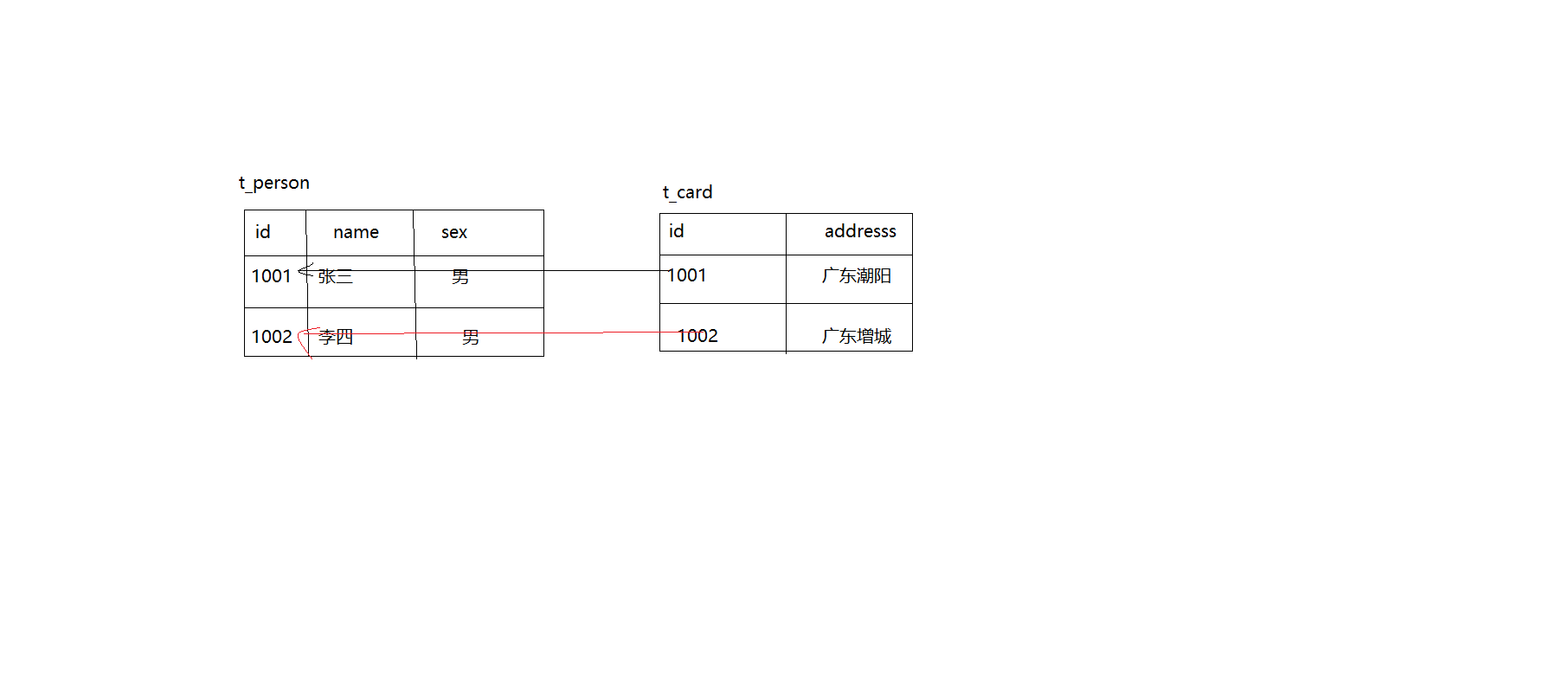
- 类结构
- Card.java
1
2
3
4
5
6
7
8
9
10
11
12
13
14
15
16
17
18
19
20package com.zhuchuli.vo;
public class Card {
private String id;
private String address;
public String getId() {
return id;
}
public void setId(String id) {
this.id = id;
}
public String getAddress() {
return address;
}
public void setAddress(String address) {
this.address = address;
}
}
- Person.java
1 | package com.zhuchuli.vo; |
- 映射文件
- Card.hbm.xml
1
2
3
4
5
6
7
8
9
10
11
12<hibernate-mapping package="com.zhuchuli.vo">
<class name="Card" table="t_card">
<id name="id" column="id">
<generator class="assigned"/>
</id>
<!-- property 指定属性的映射 -->
<property name="address"></property>
</class>
</hibernate-mapping>
- Person.hbm.xml
1 | <hibernate-mapping package="com.zhuchuli.vo"> |
- 测试
1
2
3
4
5
6
7
8
9
10
11
12
13
14
15
16
17
18
19
20
21
22
23
24
25
26
27
28
29
30
31
32
33
34
35
36
37
38
39
40
41
42
43
44
45
46
47
48
49
50
51
52
53
54
55
56
57
58
59
60
61
62
63
64
65
66
67
68
69
70
71
72
73
74
75
76
77
78
79
80
81
82
83
84
85
86
87
88package com.zhuchuli.test;
import org.hibernate.Session;
import org.hibernate.Transaction;
import org.hibernate.cfg.Configuration;
import org.hibernate.tool.hbm2ddl.SchemaExport;
import org.junit.After;
import org.junit.Before;
import org.junit.Test;
import com.zhuchuli.util.HibernateUtil;
import com.zhuchuli.vo.Card;
import com.zhuchuli.vo.Person;
public class HibernateTest {
private Session session=null;
private Transaction tx=null;
public void setUp() {
try {
//获取Session对象
session = HibernateUtil.getSession();
//获取事务并且开启事务
tx = session.beginTransaction();
} catch (Exception e) {
e.printStackTrace();
}
}
public void tear() {
HibernateUtil.close();
}
/***
* 将对象信息 转换为 关系信息
*/
public void testCreateDB() {
Configuration cfg=new Configuration().configure();
//使得hibernate映射信息转化为ddl(数据库定义语言)
SchemaExport se = new SchemaExport(cfg);
//第一参数:是否打印ddl语句
//第二个参数:是否将ddl到数据库执行
se.create(true, true);
}
/***
* 一对多关联时保存数据会多出n挑更新语句,降低效率
* 一般不会使用一对多来关联映射
*/
public void testInit() {
try {
Card c1=new Card();
c1.setId("1001");
c1.setAddress("广东潮阳");
Card c2=new Card();
c2.setId("1002");
c2.setAddress("广东增城");
Person p1=new Person();
p1.setName("张三");
p1.setSex("男");
p1.setCard(c1);
Person p2=new Person();
p2.setName("李四");
p2.setSex("男");
p2.setCard(c2);
session.save(c1);
session.save(c2);
session.save(p1);
session.save(p2);
tx.commit();
} catch (Exception e) {
if(tx!=null)tx.rollback();
e.printStackTrace();
}
}
//关联映射主要为查询服务 当具有多对一关系时,在获取多的一段的信息时可以直接获取一的一端的信息
public void testGet() {
Person person=(Person) session.get(Person.class, "1001");
System.out.println(person.getName() + "\t" + person.getSex());
System.out.println("----------------------------------------");
System.out.println(person.getCard().getAddress());
}
}
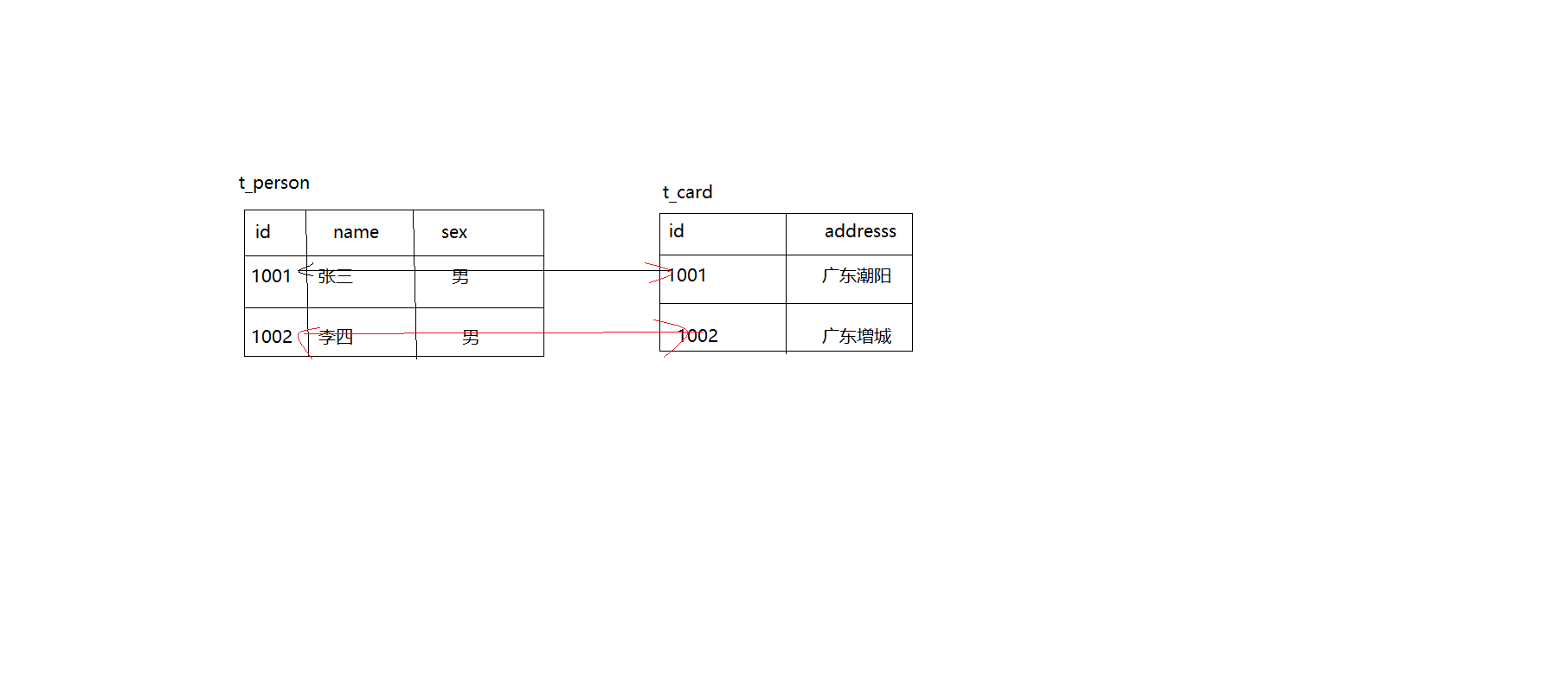
关联映射之基于主键的双向一对一
- 身份证和人之间的关系:
- 表结构:
- 类结构
- Card.java
1
2
3
4
5
6
7
8
9
10
11
12
13
14
15
16
17
18
19
20
21
22
23
24
25package com.zhuchuli.vo;
public class Card {
private String id;
private String address;
private Person person;
public String getId() {
return id;
}
public void setId(String id) {
this.id = id;
}
public String getAddress() {
return address;
}
public void setAddress(String address) {
this.address = address;
}
public void setPerson(Person person){
this.person=person;
}
public Person getPerson(){
return person;
}
}
- Person.java
1 | package com.zhuchuli.vo; |
- 映射文件
- Card.hbm.xml
1
2
3
4
5
6
7
8
9
10
11
12<hibernate-mapping package="com.zhuchuli.vo">
<class name="Card" table="t_card">
<id name="id" column="id">
<generator class="assigned"/>
</id>
<!-- property 指定属性的映射 -->
<property name="address"></property>
<one-to-one name="person"/>
</class>
</hibernate-mapping>
- Person.hbm.xml
1 | <hibernate-mapping package="com.zhuchuli.vo"> |
- 测试
1
2
3
4
5
6
7
8
9
10
11
12
13
14
15
16
17
18
19
20
21
22
23
24
25
26
27
28
29
30
31
32
33
34
35
36
37
38
39
40
41
42
43
44
45
46
47
48
49
50
51
52
53
54
55
56
57
58
59
60
61
62
63
64
65
66
67
68
69
70
71
72
73
74
75
76
77
78
79
80
81
82
83
84
85
86
87
88
89
90
91
92
93
94package com.zhuchuli.test;
import org.hibernate.Session;
import org.hibernate.Transaction;
import org.hibernate.cfg.Configuration;
import org.hibernate.tool.hbm2ddl.SchemaExport;
import org.junit.After;
import org.junit.Before;
import org.junit.Test;
import com.zhuchuli.util.HibernateUtil;
import com.zhuchuli.vo.Card;
import com.zhuchuli.vo.Person;
public class HibernateTest {
private Session session=null;
private Transaction tx=null;
public void setUp() {
try {
//获取Session对象
session = HibernateUtil.getSession();
//获取事务并且开启事务
tx = session.beginTransaction();
} catch (Exception e) {
e.printStackTrace();
}
}
public void tear() {
HibernateUtil.close();
}
/***
* 将对象信息 转换为 关系信息
*/
public void testCreateDB() {
Configuration cfg=new Configuration().configure();
//使得hibernate映射信息转化为ddl(数据库定义语言)
SchemaExport se = new SchemaExport(cfg);
//第一参数:是否打印ddl语句
//第二个参数:是否将ddl到数据库执行
se.create(true, true);
}
/***
* 一对多关联时保存数据会多出n挑更新语句,降低效率
* 一般不会使用一对多来关联映射
*/
public void testInit() {
try {
Card c1=new Card();
c1.setId("1001");
c1.setAddress("广东潮阳");
Card c2=new Card();
c2.setId("1002");
c2.setAddress("广东增城");
Person p1=new Person();
p1.setName("张三");
p1.setSex("男");
p1.setCard(c1);
Person p2=new Person();
p2.setName("李四");
p2.setSex("男");
p2.setCard(c2);
session.save(c1);
session.save(c2);
session.save(p1);
session.save(p2);
tx.commit();
} catch (Exception e) {
if(tx!=null)tx.rollback();
e.printStackTrace();
}
}
//关联映射主要为查询服务 当具有多对一关系时,在获取多的一段的信息时可以直接获取一的一端的信息
public void testGet() {
Person person=(Person) session.get(Person.class, "1001");
System.out.println(person.getName() + "\t" + person.getSex());
System.out.println("----------------------------------------");
System.out.println(person.getCard().getAddress());
System.out.println("==========================");
Card card=(Card)session.get(Card.class,"1001");
System.out.println(card.getAddress());
System.out.println("---------------------");
System.out.println(card.getPerson().getName()+"\t"+card.getPerson().getSex);
}
}
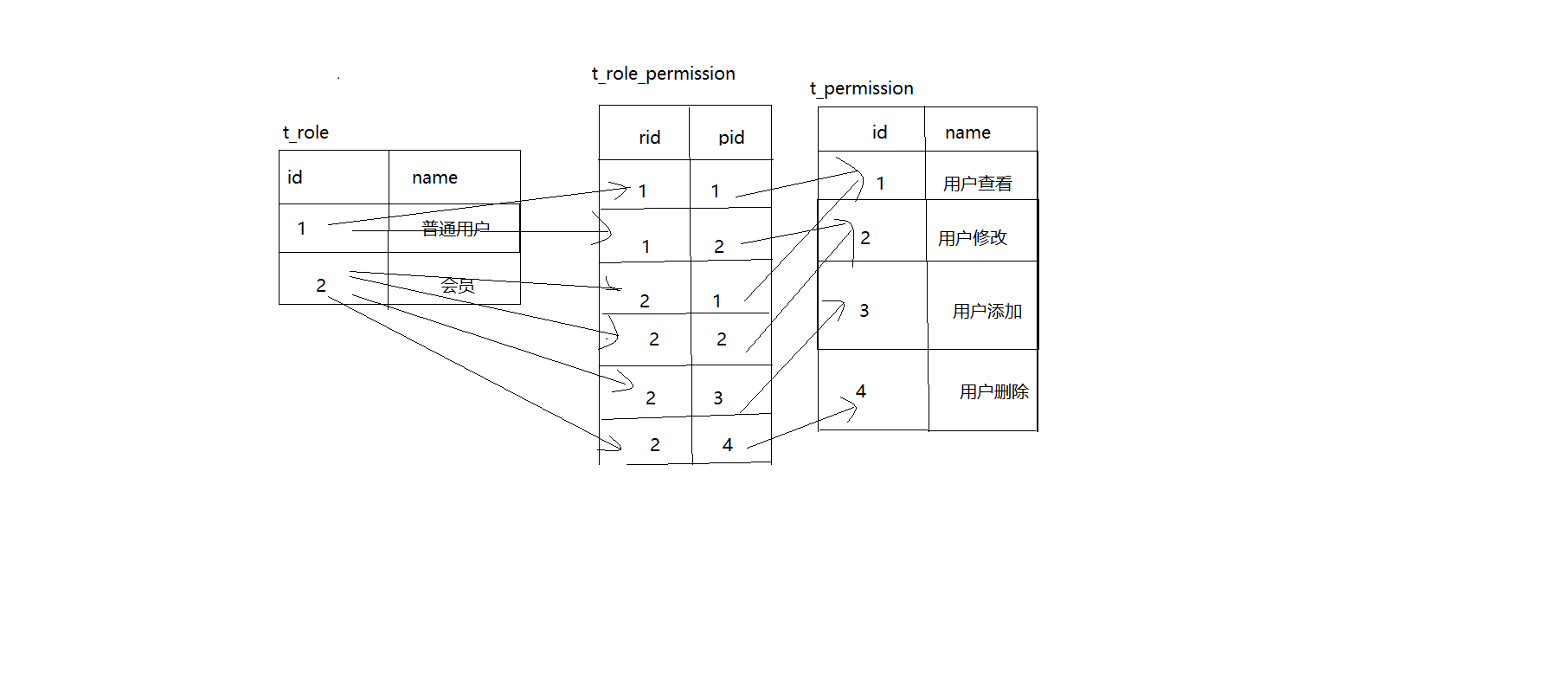
关联映射之基于主键的单向多对多
- 角色和权限之间的关系是多对多
- 表结构
- 类结构
- Role.java
1
2
3
4
5
6
7
8
9
10
11
12
13
14
15
16
17
18
19
20
21
22
23
24public class Role implements Serializable{
private int id;
private String name;
private Set<Permission> permissions=new HashSet<Permission>();
public Set<Permission> getPermissions() {
return permissions;
}
public void setPermissions(Set<Permission> permissions) {
this.permissions = permissions;
}
public int getId() {
return id;
}
public void setId(int id) {
this.id = id;
}
public String getName() {
return name;
}
public void setName(String name) {
this.name = name;
}
}
- permission.java
1 | public class Permission implements Serializable{ |
- 映射文件
- Permission.hbm.xml
1
2
3
4
5
6
7
8
9
10
11
12<hibernate-mapping package="com.zhuchuli.vo">
<class name="Permission" table="t_permission">
<id name="id" column="id">
<generator class="native"/>
</id>
<!-- property 指定属性的映射 -->
<property name="name"></property>
</class>
</hibernate-mapping>
- Role.hbm.xml
1 | <hibernate-mapping package="com.zhuchuli.vo"> |
- 测试
1
2
3
4
5
6
7
8
9
10
11
12
13
14
15
16
17
18
19
20
21
22
23
24
25
26
27
28
29
30
31
32
33
34
35
36
37
38
39
40
41
42
43
44
45
46
47
48
49
50
51
52
53
54
55
56
57
58
59
60
61
62
63
64
65
66
67
68
69
70
71
72
73
74
75
76
77
78
79
80
81
82public class HibernateTest {
private Session session=null;
private Transaction tx=null;
public void setUp() {
try {
//获取Session对象
session = HibernateUtil.getSession();
//获取事务并且开启事务
tx = session.beginTransaction();
} catch (Exception e) {
e.printStackTrace();
}
}
public void tear() {
HibernateUtil.close();
}
/***
* 将对象信息 转换为 关系信息
*/
public void testCreateDB() {
Configuration cfg=new Configuration().configure();
//使得hibernate映射信息转化为ddl(数据库定义语言)
SchemaExport se = new SchemaExport(cfg);
//第一参数:是否打印ddl语句
//第二个参数:是否将ddl到数据库执行
se.create(true, true);
}
/***
* 一对多关联时保存数据会多出n挑更新语句,降低效率
* 一般不会使用一对多来关联映射
*/
public void testInit() {
try {
Role r1=new Role();
r1.setName("普通用户");
Role r2=new Role();
r2.setName("会员");
Permission p1=new Permission();
p1.setName("用户查看");
Permission p2=new Permission();
p2.setName("用户添加");
Permission p3=new Permission();
p3.setName("用户修改");
Permission p4=new Permission();
p4.setName("用户删除");
session.save(p1);
session.save(p2);
session.save(p3);
session.save(p4);
r1.getPermissions().add(p1);
r1.getPermissions().add(p2);
r2.getPermissions().add(p1);
r2.getPermissions().add(p2);
r2.getPermissions().add(p3);
r2.getPermissions().add(p4);
session.save(r1);
session.save(r2);
tx.commit();
} catch (Exception e) {
if(tx!=null)tx.rollback();
e.printStackTrace();
}
}
//多对多测试
public void testGet() {
Role r=(Role)session.get(Role.class, 2);
System.out.println(r.getName());
System.out.println("--------------------------");
for (Permission p : r.getPermissions()) {
System.out.println(p.getName());
}
}
}
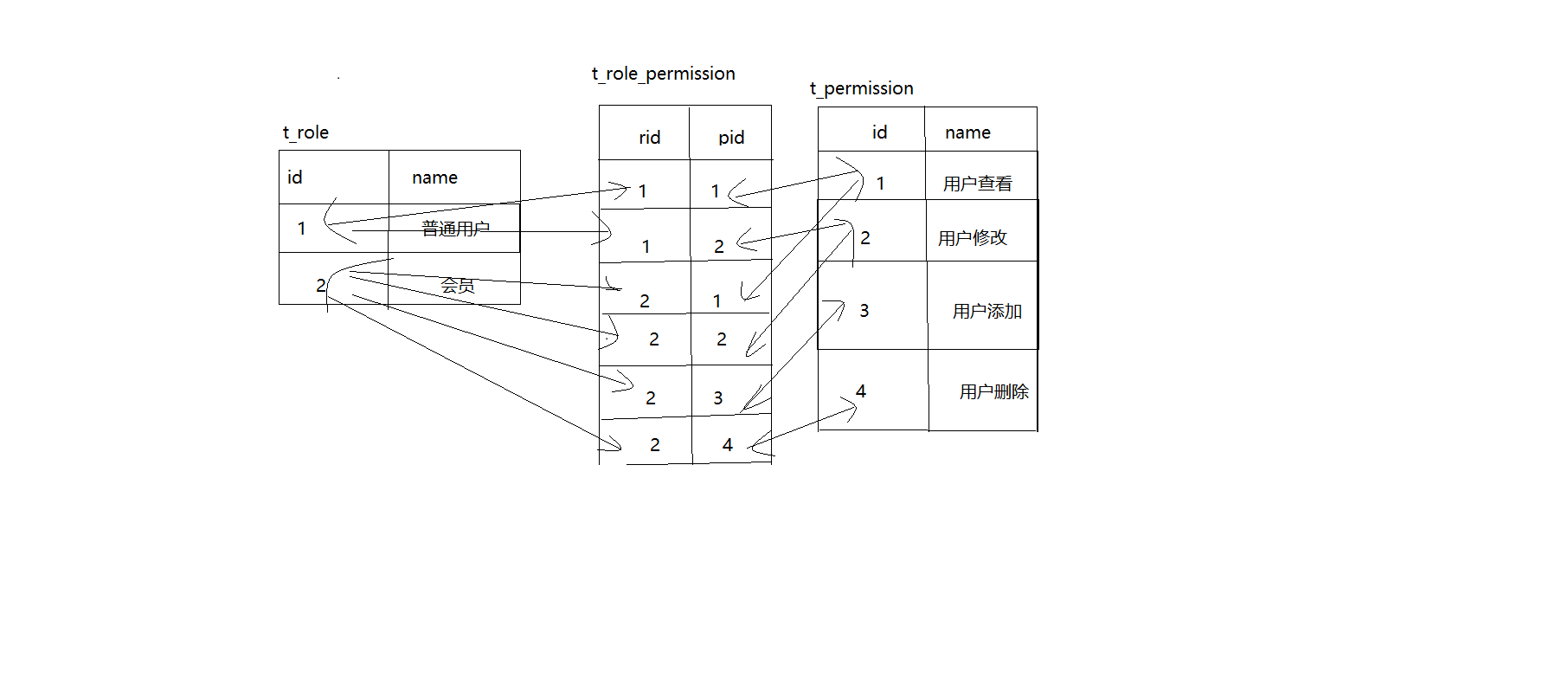
关联映射之基于主键的双向多对多
- 角色和权限之间的关系是多对多
- 表结构
- Role.java
1 | public class Role implements Serializable{ |
- permission.java
1 | public class Permission implements Serializable{ |
- 映射文件
- Permission.hbm.xml
1
2
3
4
5
6
7
8
9
10
11
12
13
14
15<hibernate-mapping package="com.zhuchuli.vo">
<class name="Permission" table="t_permission">
<id name="id" column="id">
<generator class="native"/>
</id>
<!-- property 指定属性的映射 -->
<property name="name"></property>
<set name="roles" table="t_role_permission" inverse="true">
<key column="pid"></key>
<many-to-many column="rid" class="Role"></many-to-many>
</set>
</class>
</hibernate-mapping>
- Role.hbm.xml
1 | <hibernate-mapping package="com.zhuchuli.vo"> |
- 测试
1
2
3
4
5
6
7
8
9
10
11
12
13
14
15
16
17
18
19
20
21public class HibernateTest {
//多对多测试
public void testGet() {
Role r=(Role)session.get(Role.class, 2);
System.out.println(r.getName());
System.out.println("--------------------------");
for (Permission p : r.getPermissions()) {
System.out.println(p.getName());
}
System.out.println("=====================");
Permission p=(Permission)session.get(Permission.class,2);
System.out.println(p.getName());
System.out.println("-------------------------");
for (Role r2 : p.getRoles()) {
System.out.println(r2.getName());
}
}
}
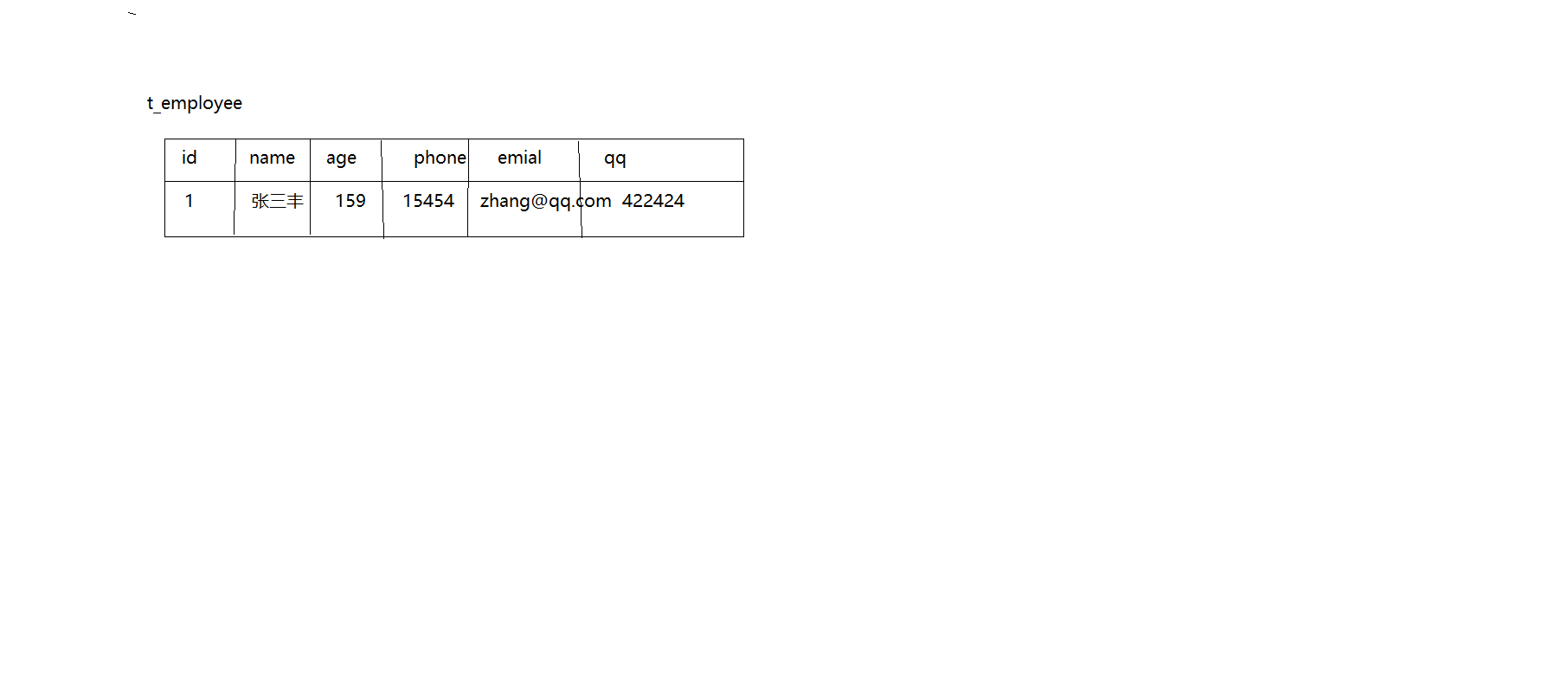
关联映射之组件映射 (一个表多个类)
- 如果一个员工有多个联系方式的情况下,可以将联系方式单独提出一个类来进行管理。
- 表结构
- 类结构
- Links.java
1
2
3
4
5
6
7
8
9
10
11
12
13
14
15
16
17
18
19
20
21
22
23
24public class Links {
private String qq;
private String email;
private String phone;
public String getQq() {
return qq;
}
public void setQq(String qq) {
this.qq = qq;
}
public String getEmail() {
return email;
}
public void setEmail(String email) {
this.email = email;
}
public String getPhone() {
return phone;
}
public void setPhone(String phone) {
this.phone = phone;
}
}
- Employee.java
1 | public class Employee { |
映射文件
- Employee.hbm.xml
1
2
3
4
5
6
7
8
9
10
11
12
13
14
15
16
17
18
19<!-- package用于指定类所在的包,如果不指定,那么在指定class的name时,需要指定完全限定名 -->
<hibernate-mapping package="com.zhuchuli.vo">
<class name="Employee" table="t_employee">
<id name="id" column="id">
<generator class="native"/>
</id>
<!-- property 指定属性的映射 -->
<property name="name"></property>
<property name="age"></property>
<component name="link" class="Links">
<property name="email"></property>
<property name="qq"></property>
<property name="phone"></property>
</component>
</class>
</hibernate-mapping>测试
1
2
3
4
5
6
7
8
9
10
11
12
13
14
15
16
17
18
19
20
21
22
23
24
25
26
27
28
29
30
31
32
33
34
35
36
37
38
39
40
41
42
43
44
45
46
47
48
49
50
51
52
53
54
55
56
57
58
59
60
61
62
63
64public class HibernateTest {
private Session session=null;
private Transaction tx=null;
public void setUp() {
try {
//获取Session对象
session = HibernateUtil.getSession();
//获取事务并且开启事务
tx = session.beginTransaction();
} catch (Exception e) {
e.printStackTrace();
}
}
public void tear() {
HibernateUtil.close();
}
/***
* 将对象信息 转换为 关系信息
*/
public void testCreateDB() {
Configuration cfg=new Configuration().configure();
//使得hibernate映射信息转化为ddl(数据库定义语言)
SchemaExport se = new SchemaExport(cfg);
//第一参数:是否打印ddl语句
//第二个参数:是否将ddl到数据库执行
se.create(true, true);
}
/***
* 一对多关联时保存数据会多出n挑更新语句,降低效率
* 一般不会使用一对多来关联映射
*/
public void testInit() {
try {
Links link=new Links();
link.setEmail("dshaui@qq.com");
link.setPhone("4241564361");
link.setQq("535313123");
Employee e1=new Employee();
e1.setName("张三丰");
e1.setAge(125);
e1.setLink(link);
session.save(e1);
tx.commit();
} catch (Exception e) {
if(tx!=null)tx.rollback();
e.printStackTrace();
}
}
//关联映射主要为查询服务 当具有多对一关系时,在获取多的一段的信息时可以直接获取一的一端的信息
public void testGet() {
Employee e=(Employee)session.get(Employee.class, 1);
System.out.println(e.getName()+"\t"+e.getAge());
System.out.println("----------------");
System.out.println(e.getLink().getEmail());
System.out.println(e.getLink().getQq());
System.out.println(e.getLink().getPhone());
}
}
OpenSessionInView
组合主键
- 学生管理系统中,成绩表的主键组合主键。
- 表结构
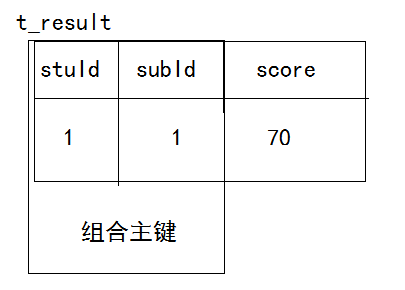
- 组合主键在Hibernate中类的结构有3种
- 类结构1:Result.java
1
2
3
4
5
6
7
8
9
10
11
12
13
14
15
16
17
18
19
20
21
22
23
24public class Result implements Serializable{
private int stuId;
private int subId;
private double score;
public int getStuId() {
return stuId;
}
public void setStuId(int stuId) {
this.stuId = stuId;
}
public int getSubId() {
return subId;
}
public void setSubId(int subId) {
this.subId = subId;
}
public double getScore() {
return score;
}
public void setScore(double score) {
this.score = score;
}
}
- 类的结构2 ResultPK.java、Result.java
1 | public class ResultPK implements Serializable { |
1 |
|
- 类的结构3
- Student、Subject是一个单独的类,需要把它们配置成Result的成员变量。
1 | package com.zhuchuli.vo; |
1 | /*** |
1 | package com.zhuchuli.vo; |
- 映射文件
- 类结构1 相匹配的映射文件: Result.hbm.xml
1
2
3
4
5
6
7
8
9
10
11
12<hibernate-mapping package="com.zhuchuli.vo">
<class name="Result" table="t_result">
<!-- 组合主键映射 -->
<composite-id>
<key-property name="stuId"></key-property>
<key-property name="subId"></key-property>
</composite-id>
<!-- property 指定属性的映射 -->
<property name="score"></property>
</class>
</hibernate-mapping>
- 类结构2 相匹配的映射文件: Result.hbm.xml
1 | <hibernate-mapping package="com.zhuchuli.vo"> |
- 类结构3 相匹配的映射文件: Result.hbm.xml、Student.hbml.xml、Subject.hbm.xml
1 | <!-- package用于指定类所在的包,如果不指定,那么在指定class的name时,需要指定完全限定名 --> |
1 | <hibernate-mapping package="com.zhuchuli.vo"> |
1 | <!-- package用于指定类所在的包,如果不指定,那么在指定class的name时,需要指定完全限定名 --> |
- 测试
- 类结构1、类结构2、类结构3测试
1
2
3
4
5
6
7
8
9
10
11
12
13
14
15
16
17
18
19
20
21
22
23
24
25
26
27
28
29
30
31
32
33
34
35
36
37
38
39
40
41
42
43
44
45
46
47
48
49
50
51
52
53
54
55public class HibernateTest {
private Session session=null;
private Transaction tx=null;
public void setUp() {
try {
//获取Session对象
session = HibernateUtil.getSession();
//获取事务并且开启事务
tx = session.beginTransaction();
} catch (Exception e) {
e.printStackTrace();
}
}
public void tear() {
HibernateUtil.close();
}
/***
* 将对象信息 转换为 关系信息
*/
public void testCreateDB() {
Configuration cfg=new Configuration().configure();
//使得hibernate映射信息转化为ddl(数据库定义语言)
SchemaExport se = new SchemaExport(cfg);
//第一参数:是否打印ddl语句
//第二个参数:是否将ddl到数据库执行
se.create(true, true);
}
public void testInit() {
try {
Result r=new Result();
r.setStuId(1);
r.setSubId(1);
r.setScore(70);
session.save(r);
tx.commit();
} catch (Exception e) {
// TODO Auto-generated catch block
e.printStackTrace();
if(tx!=null)tx.rollback();
}
}
public void testGet() {
Result r=new Result();
r.setStuId(1);
r.setSubId(1);
Result r1=(Result) session.get(Result.class,r);
System.out.println(r1.getScore());
}
}
1 | public class HibernateTest { |
1 | public class HibernateTest { |
有序集合映射(List)
- 有序集合映射 表结构
- indx为有序值:idx
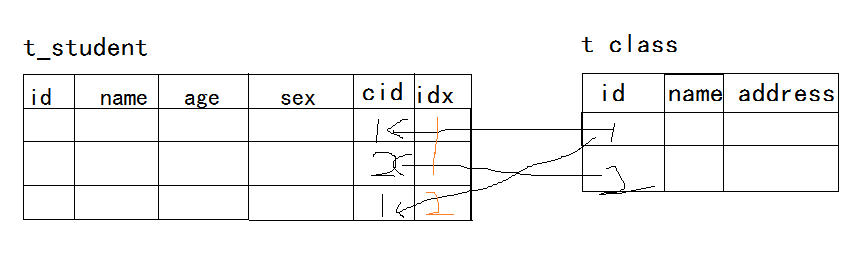
- 类结构
- Cluss.java
1
2
3
4
5
6
7
8
9
10
11
12
13
14
15
16
17
18
19
20
21
22
23
24
25
26
27
28
29
30
31public class Cluss implements Serializable{
private int id;
private String name;
private String address;
private List<Student> students=new ArrayList<Student>();
public int getId() {
return id;
}
public List<Student> getStudents() {
return students;
}
public void setStudents(List<Student> students) {
this.students = students;
}
public void setId(int id) {
this.id = id;
}
public String getName() {
return name;
}
public void setName(String name) {
this.name = name;
}
public String getAddress() {
return address;
}
public void setAddress(String address) {
this.address = address;
}
}
- Student.java
1 | public class Student implements Serializable{ |
- 映射文件
- Cluss.hbm.xml
1
2
3
4
5
6
7
8
9
10
11
12
13
14
15
16
17<hibernate-mapping package="com.zhuchuli.vo">
<class name="Cluss" table="t_class">
<id name="id">
<generator class="native"></generator>
</id>
<property name="name"></property>
<property name="address"></property>
<list name="students">
<key column="cluss_id"></key>
<!-- 有序列 顺序有hibernate来维护 -->
<list-index base="1" column="idx"></list-index>
<one-to-many class="Student"/>
</list>
</class>
</hibernate-mapping>
- Student.hbm.xml
1 | <!-- package用于指定类所在的包,如果不指定,那么在指定class的name时,需要指定完全限定名 --> |
- 测试
1
2
3
4
5
6
7
8
9
10
11
12
13
14
15
16
17
18
19
20
21
22
23
24
25
26
27
28
29
30
31
32
33
34
35
36
37
38
39
40
41
42
43
44
45
46
47
48
49
50
51
52
53
54
55
56
57
58
59
60
61
62
63
64
65
66
67
68
69
70
71
72
73
74
75
76public class HibernateTest {
private Session session=null;
private Transaction tx=null;
public void setUp() {
try {
//获取Session对象
session = HibernateUtil.getSession();
//获取事务并且开启事务
tx = session.beginTransaction();
} catch (Exception e) {
e.printStackTrace();
}
}
public void tear() {
HibernateUtil.close();
}
/***
* 将对象信息 转换为 关系信息
*/
public void testCreateDB() {
Configuration cfg=new Configuration().configure();
//使得hibernate映射信息转化为ddl(数据库定义语言)
SchemaExport se = new SchemaExport(cfg);
//第一参数:是否打印ddl语句
//第二个参数:是否将ddl到数据库执行
se.create(true, true);
}
public void testInit() {
try {
Student s1=new Student();
s1.setName("张三");
s1.setAge(23);
s1.setSex("男");
Student s2=new Student();
s2.setName("李四");
s2.setAge(21);
s2.setSex("男");
Student s3=new Student();
s3.setName("王小蒙");
s3.setAge(20);
s3.setSex("女");
session.save(s1);
session.save(s2);
session.save(s3);
Cluss c1=new Cluss();
c1.setName("D-201");
c1.setAddress("d-201");
Cluss c2=new Cluss();
c2.setName("C-201");
c2.setAddress("c-201");
c1.getStudents().add(s1);
c1.getStudents().add(s3);
c2.getStudents().add(s2);
session.save(c1);
session.save(c2);
tx.commit();
} catch (Exception e) {
// TODO Auto-generated catch block
e.printStackTrace();
if(tx!=null)tx.rollback();
}
}
public void testGet() {
Cluss c1=(Cluss) session.get(Cluss.class,1);
System.out.println(c1.getName() + "\t" +c1.getAddress());
System.out.println("------------------------------");
for (Student s : c1.getStudents()) {
System.out.println(s.getName() + "\t" + s.getSex() + "\t" + s.getAge());
}
}
}
cascade 和 inverse
- cascade 级联:操作一个对象时,可以附带操作关联对象
1
<many-to-one name="card" column="card_id" cascade="save-update"></many-to-one>
- 在many-to-one中 将级联设置为save-update,意味着在保存多的一端数据时,会检查关联对象,如果关联对象没有保存或更新,那么级联会将关联对象保存和更新.如果cascase值为delete,那么会级联将关联对象删除,如果有多个记录关联同一个级联对象时会报错,不建议设置为delete,如果值为all,所有相关动作都会级联,建议在many-to-one时设置save-update.
1 | <set name="students" cascade="save-update"> |
- 在one-to-many中,如果cascase是save-update,会级联保存多的一端数据,前提要在一的一端设置关联对象,但是会多出n条update语句,所以不建议在一的一端设置为save-update,如果cascase值为delete,会级联会删除多的一端的数据。一般情况下不会设置delete,在企业中,删除大多数为虚拟删除。
- invers:反e转,表示控制关系(外健)由谁来管理。多的一方默认是管理(外健)的,一的一方默认也是管理关系的。但是一的一方可以设置inverse=true,让另一方来控制关系,有一的一方控制关系,那么在管理关系会发出update语句。invserse控制是谁来管理关系。cascade控制如何级联操作。
hql
- HQL:hibernate query language:hibernate的查询语句,是一种完全面向对象的查询语言。编写Hql语句 和 sql几乎相同 ,关键字都一样,不区分大小写,hql查询的是类,不是表,字段写属性名,而不是表中字段名
Criteria查询
- 完全面向对象查询
本地sql
- Hibernate支持跨数据平台,导致一些数据库特有的功能Hibernate不支持。所以Hibernate提供了解决方法,那就是使用本地sql进行查询 –hibernate支持使用sql进行。
过滤器
- 过滤器:处理具有“显性(visibility)”规则的数据
- 使用Hibernate filter。 Hibernate filter是全局有效的、具有名字、可以带参数的过滤器, 对于某个特定的Hibernate session您可以选择是否启用(或禁用)某个过滤器。
- 使用步骤
- 定义过滤器
1
2
3
4
5<!-- 过滤器的定义 name是过滤器的名称 全局唯一 -->
<filter-def name="userFilter">
<!-- 过滤器可以携带参数,需要指定参数的名称和类型 -->
<filter-param name="age" type="int"/>
</filter-def>
- 在类的映射文件中引用过滤器
1 | <!-- 引用过滤器时 需要指定名称和条件 --> |
- 在类中的应用
1 | /*** |
加载策略和抓取策略
加载策略指hibernate如何查询数据,加载策略有两种方式:一种是即时架加载,一种是延迟加载。
即时加载策略是指调用方法立即到数据库查询。
get方法:是属于即时加载策略
1
2
3
4
5
6
7
8/**
* get()是属于及时加载,获取数据时,如果不存在返回null
*/
public void testGet() {
User user=(User)session.get(User.class, 1);
System.out.println(user.getName());
}List()方法也属性即时加载策略
1
2
3
4
5
6
7
8
9/**
* 测试List:该方法也是及时加载
*/
public void testList() {
List<User> users=session.createQuery("from User").list();
System.out.println("----------------");
System.out.println(users.size());
}
- 即时记载在需要立即使用数据时使用。— 响应速度比较快。
- 延迟加载又称为懒加载 —> 懒加载可以提供系统使用率,在调用方法时不会立即到数据库查询数据,只有真正使用到数据时才去数据库查询。
1 | /*** |
- 懒加载:在关联查询中也可以使用懒加载;
- Many-to-one:
1
<many-to-one name="cluss" column="cluss_id" lazy="proxy"></many-to-one>
- Lazy的值默认是proxy,是懒加载模式
- no-proxy:也是懒加载模式,只是加载对象不使用代理。
- lazy=”false”时采用即时加载。
- set
1 | <set name="students" lazy="true"> |
- lazy=”true”默认,采用懒加载
- Lazy=”false”:采用即时加载,一次将关联对象查询出来。
- Lazy=”extra”:聪明的懒加载模式,如果只是查询关联对象的大小时,只会查询个数,不会查询数据。
- Class:查询对象默认是lazy=true
- property默认是lazy=false
- 抓取策略:指查询数据时,采用什么样的sql语句来查询。
1
<many-to-one name="cluss" column="cluss_id" lazy="proxy" fetch="select"></many-to-one>
- Select采用的是select语句查询数据,默认采用select,在这种抓取策略下lazy才有意义。
- Join抓取,采用的额join语句查询数据,一次将关联数据查出,lazy没有意义了。
一级缓存、二级缓存和查询缓存
- 缓存:提高执行效率。
- hibernate提供了3类缓存:一级缓存,二级缓存,查询缓存。
- 一级缓存又称为session缓存,是线程级别的缓存。生命周期比较短。
- get()方法获取,先检查缓存中是否有该数据,如果有直接使用,如果没有那么从数据库中查询,并写入缓存。
1
2
3
4
5
6
7
8
9
10
11/**
* get()属于一级缓存
*/
public void testGet() {
User user=(User)session.get(User.class, 1);
System.out.println(user.getName());
System.out.println("---------------");
user=(User)session.get(User.class, 1);
System.out.println(user.getName());
}
- load()方法获取数据,先检查缓存中是否有该数据,如果有直接使用,如果没有那么从数据库中查询,并写入缓存。
1 | /** |
- List()方法,直接从数据库中获取,获取后将数据存入到缓存中
1 | /** |
- iterate()方法,属于懒加载模式,先获取数据的id,如果使用数据再根据id查询数据,是一种延迟加载方式。Iterate方法获取数据时会先插件缓存,如果有直接使用,如果没有再去数据库查询,然后再把查询结果写入到缓存中。
- 1 和 N+1 问题:
1是指list方法通过一条sql语句将所有的数据查询出来,而iterate方法通过n+1条sql语句将数据查询。他们的不同在于加载数据的方式不同。- 缓存的管理:一般情况下不用管理一级缓存,如果在进行批量处理时需要管理缓存。清理缓存可以使用:evict清除指定对象,clear清空缓存,flush刷新缓存数据,close关闭缓存。
- 二级缓存又称为SessionFactory缓存,是进程级别的,生命周期比较长,并且可以在集群中使用。缓存的数据比较多,当需要清理缓存使用相关算法进行清理。比如:LRU和FIFO等。Hibernate二级缓存采用第三方插件来实现。
- 二级缓存使用步骤:
- 新建项目
- 导入jar包
- 添加ehcache.xml配置文件到src下
1
2
3
4
5
6
7
8
9
10
11
12
13
14<!--
maxElementsInMemory:最多缓存元素的个数
eternal:是否永久缓存
timeToIdleSeconds 空闲时间
timeToLiveSeconds 存活时间
overflowToDisk 是否溢出到磁盘
-->
<defaultCache
maxElementsInMemory="10000"
eternal="false"
timeToIdleSeconds="120"
timeToLiveSeconds="120"
overflowToDisk="true"
/>
- 在hibernate.cfg.xml开启二级缓存
1 | <!-- 开启二级缓存 --> |
- 在映射文件中添加
<cache/>标签
1 | <class name="User" table="t_user" schema=""> |
- 测试:使用二级缓存时,说明在关闭session时还能继续查到数据。
1 | /** |
- 查询缓存:在二级缓存的基础上使用,
- 开启查询缓存 hibernate.cfg.xml
1
2
<!-- 开启查询缓存 -->
<property name="cache.use_query_cache">true</property>
- 在查询数据时,设置查询缓存有效
setCacheable(true)
1 |
|
事务隔离级别
- 从低到高: 读取未提交,读取已提交,可重复读,序列化
- 我们一般采用读取已提交,配合各种并发访问控制策略来达到事务控制的目的。
锁机制
- 乐观锁和悲观锁